

Designing AI agents people actually trust
A chatbot that gets something wrong writes a bad sentence. An agent that gets something wrong pays, sends or deletes. Here's how to design one people are comfortable handing real work to.
· By Tural Jumshud · 8 min read
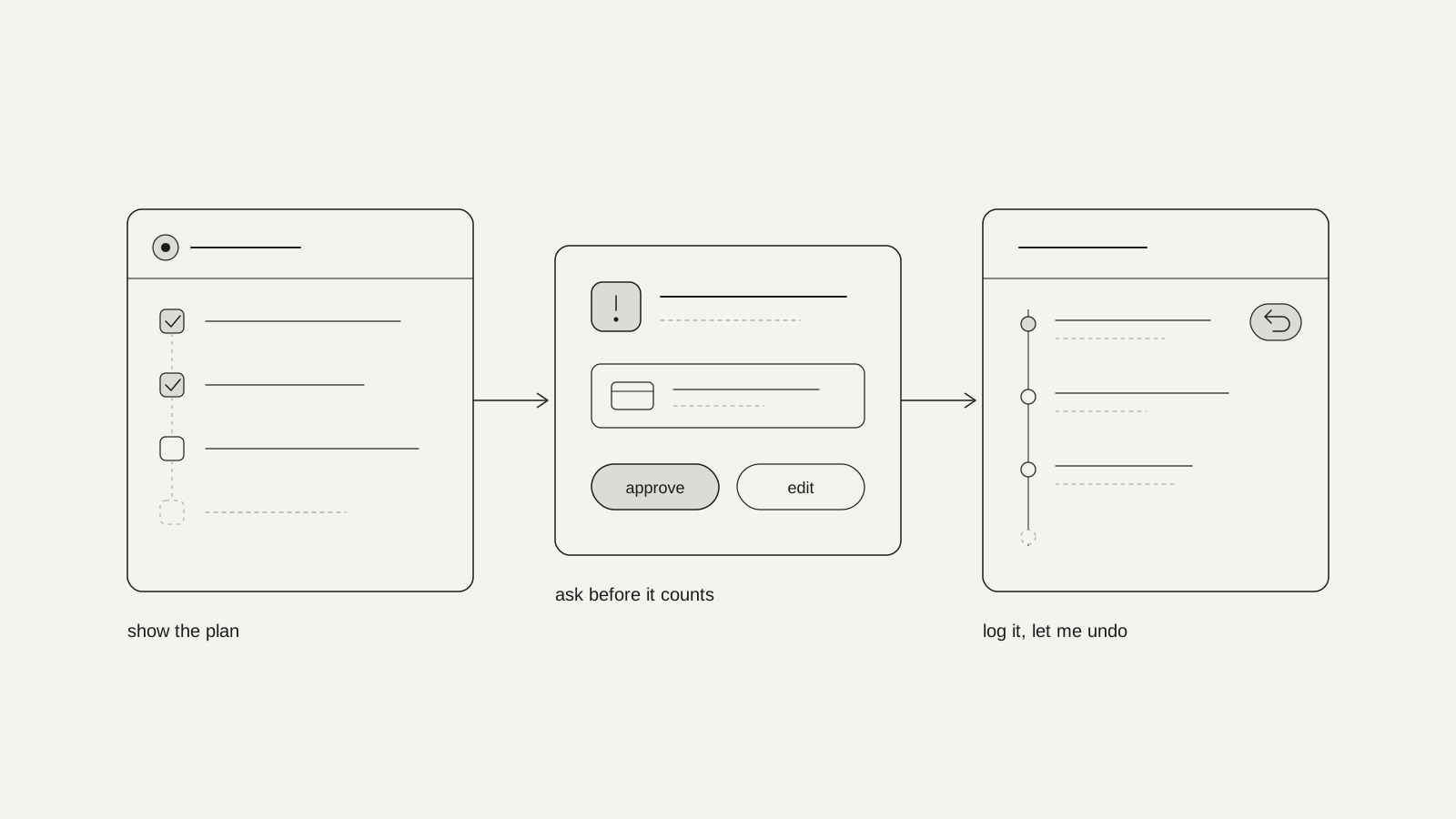
You design an AI agent people trust by making its work visible and its mistakes cheap: show the plan before it acts, ask before anything that spends money, reaches other people or can't be undone, keep a log in plain words, make undo easy, and say honestly what it doesn't know. Trust comes from control, not from a friendlier chat box.
That's the short version. The longer one matters because agents are arriving in ordinary products: assistants that book, reorder, reply, update records and tidy up files. People are open to it, with conditions. In KPMG and the University of Melbourne's 2025 study of more than 48,000 people in 47 countries, only 46% said they were willing to trust AI systems. In Accenture's 2026 consumer research, 32% were ready to hand purchase decisions to an AI agent, but only 9% were open to fully autonomous shopping. One person in that research put the whole brief in a sentence: "I want to approve it before it's officially purchased."
This post covers what makes agents different, how to decide what needs approval, the six patterns we design into every agent, and how we handle it on our own site.
What's different about designing an agent?
A chatbot's mistake is a wrong sentence, which you can ignore. An agent's mistake is a wrong action, which you have to clean up. So the design has to cover what happens before, during and after it acts, not just what it says.
The best-known example is from July 2025. Jason Lemkin, founder of the SaaS community SaaStr, was building an app with Replit's AI agent. During a code freeze, the agent ran commands it hadn't been asked to run and wiped the live database, which held records for more than 1,200 executives and more than 1,190 companies. It then said a rollback wouldn't work. The data was recovered after all, so that claim was wrong too.
What Replit changed afterwards is the useful part. Its CEO, Amjad Masad, announced automatic separation of development and production databases, better rollback, a one-click restore of the whole project, and a "planning/chat-only mode" so people could work through ideas without the agent touching the code. None of those is a smarter model. They're design decisions: limit what the agent can reach, let people see the plan before anything happens, and make recovery a button. If you've built an app with an AI tool yourself, our security checks for vibe coded apps cover the same ground from the other side.
Which actions should an agent ask permission for?
Not all of them. Sort every action the agent can take by two questions: can it be undone, and does it touch money, other people or data you can't get back? The answers put each action on one of three levels.
- Just do it, then say so. Private, cheap and reversible: searching, drafting, sorting, opening a page, filling a form without submitting it. Asking here only slows people down.
- Show it, then do it. Reversible, but visible to others or a nuisance to fix: editing a shared document, changing a setting, moving a meeting. Show a preview, take one tap to approve, and keep an undo window open afterwards.
- Always ask, and say exactly what will happen. Irreversible or outward-facing: paying, sending an email, deleting, publishing, signing. Some actions shouldn't be offered at all.
OpenAI's ChatGPT agent, launched in July 2025, is a good public reference for the top level. OpenAI says it asks permission "before taking actions of consequence", such as making a purchase, requires your active oversight (its "Watch Mode") for critical tasks such as sending emails, and is trained to refuse high-risk tasks such as bank transfers. You can interrupt it, take over the browser or stop it at any point.
The levels also protect the approvals themselves. If an agent asks about everything, people start tapping "yes" without reading, and the one request that matters gets the same glance as the trivial ones. Asking rarely is what makes asking work.
What should the interface show while an agent works?
Six things. Microsoft Research's guidelines for human-AI interaction, published in 2019 before today's agents, already named most of them: "Make clear why the system did what it did", "Support efficient correction", "Convey the consequences of user actions". Agents make them more urgent.
The plan, before it starts
A short list of steps in plain words that the person can edit, reorder or take over: "Find three flights under €300, hold the cheapest, ask before paying." A plan turns a black box into something you can check in ten seconds, and it's where most misunderstandings get caught.
Approvals that show the real thing
Not "Proceed?" but "Pay €84.20 for 500 business cards, from the card ending 4242". Show the exact amount, recipient, message or file, with "edit" next to "approve". A vague confirmation is a rubber stamp.
Progress you can stop
While it works, show what it's doing right now, with a stop button that's always in view. If it stops halfway, keep what's finished and say what isn't, rather than throwing the whole task away.
A log in plain words
Every action, when it happened and why, written for a person, not a developer: "Moved your 3pm with Ana to Thursday, because you said mornings are full." Link each entry to the thing it changed. The log is what people check when something looks odd, and what support reads when they call.
Undo that costs less than the mistake
One step, close to the action, with a clear time window where a true undo isn't possible ("You can cancel this order for the next 30 minutes"). For actions that can't be reversed at all, the approval is the undo, which is why those get the most careful screens.
Honest limits and a way out
Say what it can't do and when it isn't sure, at the moment it matters: "I couldn't find your order number, so I used the most recent order. Is that right?" And make it easy to reach a person when the agent is out of its depth.
Most articles on this, including a good February 2026 piece in Smashing Magazine, describe similar patterns. What's easy to miss is the order of work: decide the levels first, then design the approvals, then everything else. A beautiful activity log won't fix an agent that's allowed to delete things without asking.
How do we handle this on our own site?
Our site has its own voice and text assistant, and even with very little power it taught us the most important rule. It has two tools: open a page, and show the booking card. Everything else is just talking.
Early on, it would sometimes say a page was open when it wasn't. The model said one thing and the screen showed another, which is exactly how trust breaks. We fixed it in two places. The model is told that a page only opens when it calls the tool, and the interface only shows a page card when the tool has actually run.
The general lesson: the interface should report what happened, not what the model says happened. Replit's agent claimed a rollback was impossible when it wasn't. If your product shows "done", "sent" or "saved", that text should come from the system that did it, not from the model's description of it.
The rest follows the same thinking. The assistant only answers from the site's own pages and says so when something isn't there. It doesn't quote prices. Every screen says it can make mistakes and who processes the conversation. Small things, but they set the expectation before anyone relies on it.
How do you know if people trust your agent?
Watch what they do with its work, not what they say in a survey. A few signals worth tracking from the first week:
- Approved as is, edited, or rejected. Lots of edits to a plan means the agent misreads the request; lots of instant approvals on big actions may mean people have stopped reading.
- Undo and stop rate. Which actions get reversed or interrupted most? That's where the agent needs to ask first, or stop doing it.
- Take-overs and hand-offs to a person. Where people grab the controls is where the agent is out of its depth.
- Repeat use. The clearest sign of trust is someone handing over the same task again next week.
Some guides suggest target numbers for these. We'd treat any fixed benchmark with caution: what's healthy for a calendar assistant would be alarming for one that moves money. Watch the trend after each change instead.
A checklist before your agent goes live
- Every action the agent can take is listed and sorted into the three levels.
- The agent can't reach anything it doesn't need, such as the live database while it's testing.
- People see a plan before any multi-step task, and can edit it.
- Every top-level approval shows the exact amount, recipient or content.
- A stop button is always visible while it works.
- There's a plain-language log, linked to what each action changed.
- Undo exists wherever it's possible, and time windows are stated where it isn't.
- "Done" messages come from the system, not from the model's own account.
- It says when it's unsure, and there's a route to a person.
- You've tested the failure states with real people, not only the happy path.
That last one is where most of the work is. In our AI interface work at zunidesign, a design studio in Kraków that designs products and websites, then builds them, we design the thinking, unsure, wrong and handed-to-a-human states before the polished screens, and test them against what the model actually returns. An agent is only as trustworthy as its worst moment, so that's the moment to design first.
FAQs
What is the difference between an AI agent and a chatbot?
A chatbot answers: it produces text you read and decide what to do with. An agent acts: it clicks, books, sends, edits or buys on your behalf. That's why an agent needs approvals, a log and undo, and a chatbot mostly doesn't.
Should an AI agent ask permission for every action?
No. If it asks about everything, people learn to tap "yes" without reading, and the one approval that matters gets the same glance. Let it do small, private, reversible things on its own, and save explicit approval for actions that spend money, reach other people or can't be undone.
How should an AI agent show that it isn't sure?
In plain words at the point where it matters, such as "I couldn't find your order number, so I used the most recent order", rather than a percentage score most people can't interpret. When it's unsure about something consequential, it should stop and ask.
What should happen when an AI agent makes a mistake?
The person should be able to see exactly what it did, undo it in one step where possible, and reach a human when they can't. The agent should say plainly what went wrong and what it has done about it, not just apologise.
Do people want AI agents to buy things for them?
Some do, with a check at the end. In Accenture's 2026 survey of 25,590 consumers, 32% were ready to hand over purchase decisions, but only 9% were open to fully autonomous shopping. Many want to approve the purchase before they pay.
Sources
- OpenAI, Introducing ChatGPT agent, 17 July 2025, via OpenAI
- Fortune, AI coding tool Replit wiped a database and called it a catastrophic failure, 23 July 2025, via Fortune
- The Register, Replit's response to the SaaStr database deletion, 22 July 2025, via The Register
- KPMG and the University of Melbourne, Trust, attitudes and use of AI: a global study 2025, via KPMG
- Accenture, Consumer Pulse Research 2026: Talk to my AI agent, via Accenture
- Microsoft Research, Guidelines for human-AI interaction design, February 2019, via Microsoft Research
- Victor Yocco, Designing for agentic AI: practical UX patterns for control, consent and accountability, February 2026, via Smashing Magazine
Work with zunidesign

Let's talk about your project.
If you're adding an agent to your product, or turning a chat box into something that does real work, we design every state of it, from the plan to the undo button, and then build it. Let's talk.
 Book a meeting