

Your website after launch: what someone has to keep doing
Most websites don't fail on launch day. They fail slowly, a year later, because a job everyone assumed someone else was doing never got done.
· By Tural Jumshud · 8 min read
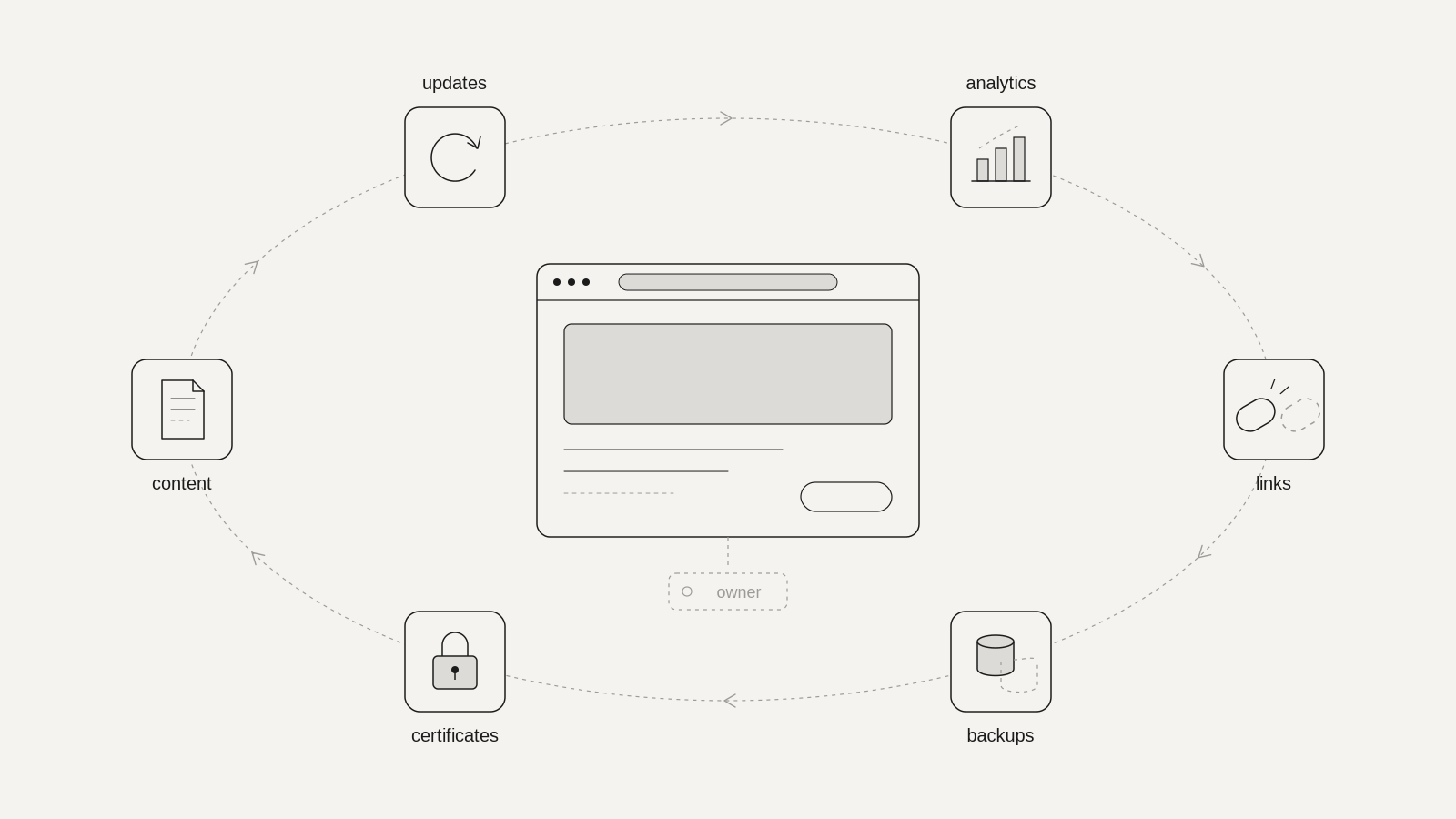
After launch, a website needs a short list of recurring jobs: security updates, backups you've proved you can restore, uptime and certificate monitoring, domain renewals, content kept current, broken links fixed, accessibility re-checked after changes, and a regular look at analytics. None of it is hard. The risk is that nobody owns it.
Most maintenance guides stop at the list, usually with a care plan attached. The list matters, but in our experience sites rarely decay because a task was unknown. They decay because the developer thought the client was watching the alerts, the client thought the host was, and the host's emails went to someone who left.
We design and build websites and then hand them over, so we plan this before launch. Here's the list we use, how often each job comes round, and how to decide who does what.
Why does a finished website need looking after?
Because the web around it keeps changing, even when your site doesn't. Software gets new security holes, browsers and certificate rules change, pages you link to disappear, and search engines and AI assistants keep re-reading what you've published.
The numbers are hard to ignore. Patchstack, which tracks WordPress security, counted 11,334 new vulnerabilities in the WordPress ecosystem in 2025, 42% more than in 2024, and 91% of them were in plugins. It found that about half of high-impact vulnerabilities were exploited within 24 hours, and that 46% had no fix from the developer by the time they were made public. Its test of popular hosting companies found their protections blocked only 26% of the attacks.
Links decay too. Pew Research Center found that 38% of web pages that existed in 2013 were no longer available ten years later, and that 23% of news pages contained at least one broken link.
What are the jobs, and how often do they come round?
Group them by rhythm. A job with a date on it gets done; a job that happens "regularly" doesn't.
Within days (sometimes hours)
- Security updates. Apply updates for the platform, plugins, themes and code libraries, starting with anything marked as a security fix. Test on a copy of the site first if you can.
- Alerts. When monitoring says the site is down, a form has stopped sending, or a certificate is about to expire, someone has to act, not just receive the email.
Every month
- Backups. Check they're still running, and keep one copy somewhere other than your host. A few times a year, restore one to a test copy: a backup you've never restored is a hope, not a backup.
- Forms and key journeys. Send yourself a contact form, book a call, complete a purchase. These break silently when an email setting or third-party service changes.
- Broken links. Run a link checker, and fix or remove what's dead, including links to your own pages after anything is renamed.
- Analytics. Confirm tracking still works, then look at what people actually do: which pages bring enquiries, where they leave, what they search for.
Every quarter
- Content. Prices, team, services, opening hours, dates, screenshots and "latest" claims. Out-of-date pages cost trust with people, and assistants can repeat them.
- Accessibility. Re-check the pages that changed. New images without descriptions and new buttons with low-contrast text are how accessible sites stop being accessible.
- Speed. Check your main pages on a phone. Large new images and added tracking scripts are the usual culprits.
- Access. Review who has logins to the site, host and analytics, and remove people who've left.
Every year
- Domain and hosting. Check renewal dates, payment cards and that the accounts are in your company's name, not a former employee's or agency's.
- The bigger picture. Is the platform still supported? Do any legal pages (privacy, cookies, accessibility statement) need updating? Is the site still telling the story of the business you are now?
What's changing about security certificates?
Certificates, the files behind the padlock in the browser bar, now expire much faster, so a quietly broken renewal shows up sooner. In April 2025 the CA/Browser Forum, the industry body that sets the rules, voted to cut the maximum lifetime of a public certificate from 398 days to 47 days in stages.
- Since 15 March 2026: 200 days at most.
- From 15 March 2027: 100 days.
- From 15 March 2029: 47 days.
Let's Encrypt, the free certificate authority many hosts use, already issues 90-day certificates and plans to move its default to 64 days in February 2027 and 45 days in February 2028. It also stopped sending expiry warning emails on 4 June 2025, and recommends a separate monitoring service instead.
For most sites, renewal is automatic and you'll never notice. But automation fails when someone moves the domain, changes DNS or switches hosts. With yearly certificates, a broken set-up could hide for months. With 47-day ones, it surfaces within weeks, often as a browser warning in front of your customers. So add certificate expiry to whatever watches your uptime, and send the alert to a shared inbox.
How do accessibility problems creep back in?
Mostly through everyday content updates, not code. WebAIM's 2026 scan of the top million home pages found detectable accessibility failures on 95.9% of them, up from 94.8% in 2025, with an average of 56.1 errors per page. The most common were low-contrast text (83.9% of pages), images without text alternatives (53.1%) and form fields without labels (51%).
Those are exactly the things a marketing team adds in a normal month: a new banner, a photo, a sign-up form. If your site has to meet the European Accessibility Act, a check after each change is part of maintenance, not a one-off audit. Our post on the European Accessibility Act a year and a half in covers who's in scope. As always, that isn't legal advice.
Who should own each job?
Split the list three ways and write the names down: your team, your developer or studio, and the platform or automation. Every automated job still needs a person who reads its alerts.
- Your team: content, forms and journeys, analytics questions, accessibility of anything you add, access reviews, and the domain and billing accounts.
- Your developer or studio: updates to code and plugins, restore tests, speed and accessibility fixes in templates, and anything that needs changing beneath the content.
- Platform and automation: uptime and certificate monitoring, scheduled backups and certificate renewal, with alerts going to a shared address someone actually reads.
The platform changes the split, not the need. On Squarespace, Webflow or Framer the provider patches its own software and usually handles certificates, so the developer's column gets shorter. On WordPress with many plugins, it gets longer. Either way, content, links, analytics and the domain stay yours.
What does that look like on our own site?
This site is a good example of how automation moves work rather than removing it. zunidesign.com is static: there's no content management system or plugins to patch, and it's deployed by Vercel from a code repository. That removes the most urgent job on a typical WordPress site.
It doesn't remove maintenance. Every post we publish has to reach the homepage, the post lists, the sitemap, the RSS feed and the llms.txt file that summarises the site for AI tools. It also has to reach the knowledge base of the site's voice and text assistant, so it can answer questions about the post and open it. Forget that last step and the assistant quietly falls behind the site. A few years ago that job didn't exist; now it's on our list, and a script does most of it, which is exactly the kind of thing to write down at handover.
How do you hand maintenance over?
Treat it as part of the project, not a goodbye email. These are the steps we follow.
Put every account in your name
Domain registrar, DNS, hosting, analytics, search console and any third-party services, owned by a company email address, with at least two people who can log in.
Write a one-page runbook
The recurring jobs, how often, who owns each one, and how to do it. If a task needs a developer, say so and say who.
Put the dates in a calendar
Monthly, quarterly and yearly checks as recurring events, with renewal dates for the domain and any paid plans.
Route alerts to a shared inbox
Uptime, certificate, form and security alerts go to an address a team reads, not a person's inbox.
Restore one backup together
Do the first restore test with whoever built the site, so you know it works and how long it takes.
Record a walkthrough
A short video of your own site: editing a page, adding an image with a description, checking a form. New starters will watch it long after the project ends.
That's the heart of our handover and training work: by launch day, every job on the list has a name next to it, and the people whose names they are know how to do it.
FAQs
What maintenance does a website need after launch?
Security updates, backups you have tested by restoring one, uptime and certificate monitoring, domain renewals, content kept current, broken links fixed, accessibility re-checked after changes, and a regular look at analytics. Each job needs a named owner.
How often should a website be checked?
Security updates and alerts need attention within days, sometimes hours. Backups, links and analytics suit a monthly check. Content, accessibility and accounts suit a quarterly review, and the domain, hosting and certificate set-up a yearly one.
Do Squarespace, Webflow or Framer sites need maintenance?
Less, because the platform patches its own software and usually renews the security certificate. You still own the content, links, forms, accessibility of what you add, analytics, the domain renewal and access to the account.
Do SSL certificates still expire if they renew automatically?
They can. Automatic renewal fails quietly when DNS, hosting or a domain setting changes. Certificate lifetimes are also shrinking, to 100 days from March 2027 and 47 days from March 2029, so renewals happen more often and a broken set-up shows sooner.
What happens if I stop updating WordPress plugins?
Known holes stay open. Patchstack counted 11,334 new vulnerabilities in the WordPress ecosystem in 2025, 91% of them in plugins, and found about half of high-impact ones were exploited within 24 hours.
Do I need a maintenance contract?
Not necessarily. You need every job to have an owner. Some teams do most of it themselves with a short monthly checklist; others pay a developer or studio for the technical parts and keep content in-house.
Sources
- Patchstack, State of WordPress Security in 2026 whitepaper, updated February 2026, via Patchstack
- CA/Browser Forum, Ballot SC-081v3: schedule of reducing certificate validity and data reuse periods, April 2025, via CA/Browser Forum
- DigiCert, TLS certificate lifetimes will officially reduce to 47 days, May 2025, via DigiCert
- Let's Encrypt, Expiration notification service has ended, June 2025, via Let's Encrypt
- Let's Encrypt, the move from 90-day to 45-day certificates, December 2025, via Let's Encrypt
- Pew Research Center, When Online Content Disappears, May 2024, via Pew Research Center
- WebAIM, The WebAIM Million: the 2026 report on the accessibility of the top 1,000,000 home pages, March 2026, via WebAIM
Work with zunidesign

Let's talk about your project.
Launching a site and not sure who will look after it? We design and build websites and plan the handover from the first week, so your team knows exactly which jobs are theirs and how to do them. Let's talk.
 Book a meeting